Patterns Magnolia Watercolor Flower
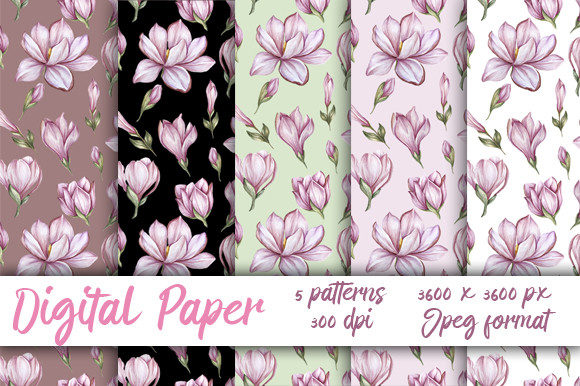
Patterns Magnolia Watercolor Flower is a digital design resource consisting of five high-resolution, seamless watercolor patterns featuring magnolia blossoms. Each pattern is delivered as a JPEG file sized at 3600×3600 pixels with a resolution of 300 dpi—optimized for print and scalable digital use. The collection emphasizes soft, natural textures and botanical elegance, with color palettes inspired by traditional watercolor techniques.
What This Product Offers—and What It Doesn’t
The core offering is practical: five ready-to-use, tileable background patterns. They are designed to repeat smoothly without visible seams, making them suitable for surface design applications such as stationery, packaging, fabric mockups, or web backgrounds. Because they’re provided in JPEG format—not layered PSD or vector AI files—they are not editable in terms of individual elements (e.g., you cannot isolate or recolor a single flower). Their utility lies in their immediacy and consistency, not customization depth.
Color fidelity is another key consideration. As noted in the product description, colors may vary slightly across devices due to differences in monitor calibration and display technology. Designers working on brand-critical projects—especially those requiring precise Pantone matching or CMYK prepress workflows—should verify output through test prints rather than relying solely on screen previews.
Who Might Benefit Most
Patterns Magnolia Watercolor Flower suits users who prioritize speed, aesthetic cohesion, and print-ready quality over granular control. For example:
- Small-business owners creating cohesive branding assets—think greeting cards, wedding invitations, or boutique product labels—can apply these patterns directly to templates without needing advanced illustration skills.
- Digital scrapbook designers or planner template creators benefit from the seamless tiling, allowing them to fill large layout areas uniformly while maintaining organic texture.
- Print-on-demand sellers can integrate the patterns into designs for mugs, notebooks, or wall art, confident that the 300 dpi resolution supports crisp reproduction up to 12×12 inches at full size.
In each case, the value stems from reducing time spent building textures from scratch while retaining visual sophistication. The magnolia motif offers a balance of familiarity and refinement—neither overly trendy nor generically floral—making it adaptable across seasons and audiences.
Tradeoffs and Practical Considerations
Because the files are JPEGs, transparency is not supported. If your workflow requires overlays, blending modes, or non-rectangular masking, you’ll need to add transparency manually in editing software—a step that adds minor overhead but remains feasible for most intermediate users.
Resolution is fixed at 3600×3600 pixels. While sufficient for standard print sizes, this limits extreme enlargement—for instance, large-format wall murals or billboard-scale applications—without interpolation or upscaling, which may soften fine watercolor grain. Users planning such uses should assess whether the texture holds up at their intended viewing distance.
The collection contains five variations, not fifty. That means less variety than expansive pattern libraries, but also less decision fatigue. It’s a focused set—not a toolkit. If your project demands dozens of coordinated options across multiple colorways or scales, this may serve better as a starting point than a complete solution.
When Alternatives May Be Worth Exploring
Consider other options if any of the following apply:
- You require vector-based scalability: SVG or AI formats allow infinite resizing without loss. Patterns Magnolia Watercolor Flower does not offer this; alternatives with vector florals would be more appropriate for logo integration or embroidery digitizing.
- You need editable layers or source files: Designers who regularly adjust hue, contrast, or composition mid-project may prefer Photoshop PSDs with masked elements or Procreate-compatible brushes that simulate similar textures interactively.
- Your work involves strict accessibility or WCAG compliance: JPEG backgrounds with low-contrast floral motifs can reduce text legibility if overlaid with body copy. Test contrast ratios when pairing with typography—this isn’t a limitation unique to this product, but one worth verifying early in layout stages.
- You’re sourcing for commercial licensing with extended rights: Confirm the license scope. Some digital paper vendors restrict use in resale templates or SaaS platforms. Review the vendor’s terms before incorporating into products you plan to redistribute.
Making a Purposeful Choice
Evaluating Patterns Magnolia Watercolor Flower isn’t about whether it’s “good” in absolute terms—it’s about alignment. Ask yourself:
- What’s my primary use case? If it’s fast, consistent, printable texture for small-run physical goods or digital downloads, the collection meets that need directly.
- What’s my technical comfort level? No special software is required beyond standard image editors (e.g., Photoshop, Affinity Photo, Canva Pro), but basic knowledge of canvas sizing and resolution settings helps avoid unintended pixelation.
- How much variation do I actually need? Five distinct patterns cover common needs—light, medium, and dark tonal ranges, plus subtle shifts in bloom density and wash intensity. More isn’t always better; coherence often matters more than quantity.
- What’s my timeline? If you’re under deadline pressure and need reliable, tested assets, this avoids the learning curve of generating custom watercolor scans or adjusting brush settings from scratch.
It’s also worth comparing against free or low-cost alternatives—but with attention to provenance and technical specs. Many free seamless patterns lack true 300 dpi resolution or contain subtle tiling artifacts that become visible in print. Patterns Magnolia Watercolor Flower’s consistency across all five files reflects intentional curation, not algorithmic generation.
Final Perspective
Patterns Magnolia Watercolor Flower occupies a specific niche: accessible, high-fidelity botanical texture for practical design tasks. It doesn’t replace illustration skills or comprehensive asset libraries—but it fills a frequent gap between concept and execution. Its strength lies in reliability, not novelty; in quiet versatility, not bold experimentation.
For designers balancing quality, efficiency, and aesthetic intent—especially those working independently or with limited production resources—it represents a grounded, no-surprise option. As with any digital paper purchase, previewing sample swatches (if available), checking license terms, and testing one pattern in your actual workflow before scaling across a project remain sound evaluation steps. When matched thoughtfully to need, it functions not as decoration, but as infrastructure.